
The gap AI Coach fills
Most interview feedback never reaches the candidate. They get a form rejection, or silence, and no answer to the one question that would actually help them: what should I do differently next time?
AI Coach closes that gap. After an interview is analyzed, our AI writes a private email to the candidate with what they did well, what they could improve, and concrete advice. The recruiter never sees the content. It runs only when both the recruiter and the candidate opt in.
This article explains exactly how that works, who sees what, and how we keep the output safe.
What the candidate receives
After the interview is processed, opted-in candidates get an email. It looks like this:
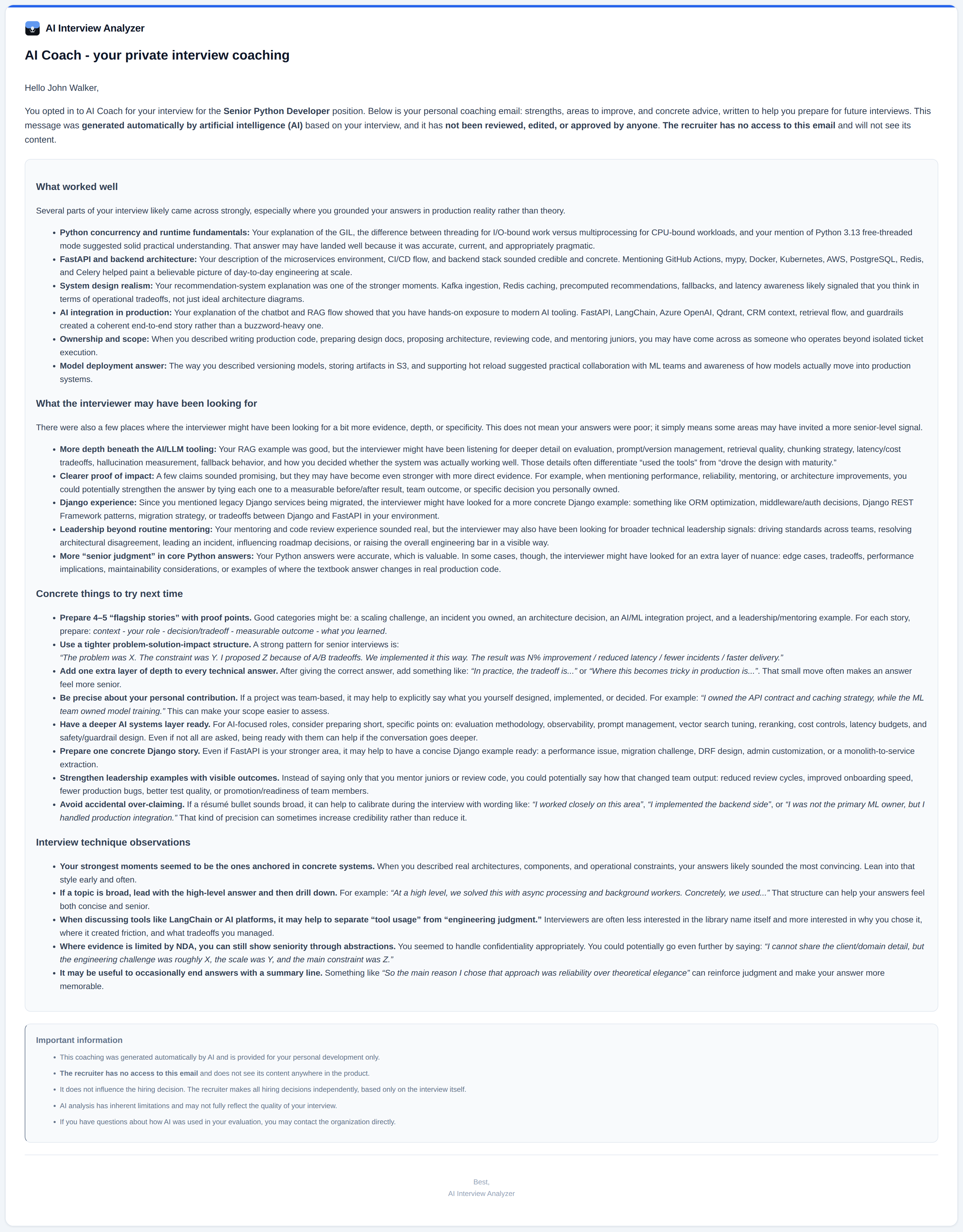
Four sections:
- Strengths. Specific moments where the candidate did well. Not generic praise.
- Areas to improve. Honest. Named specifically. No sugar-coating.
- Concrete advice. For each area, what to actually practice. Not "study more", specific.
- Interview technique. How the candidate came across. Answer structure, clarity, time management.
The tone is that of a career mentor who respects the candidate enough to tell them the truth.
Mutual opt-in
AI Coach is off by default on every side. Both the recruiter and the candidate have to actively enable it.
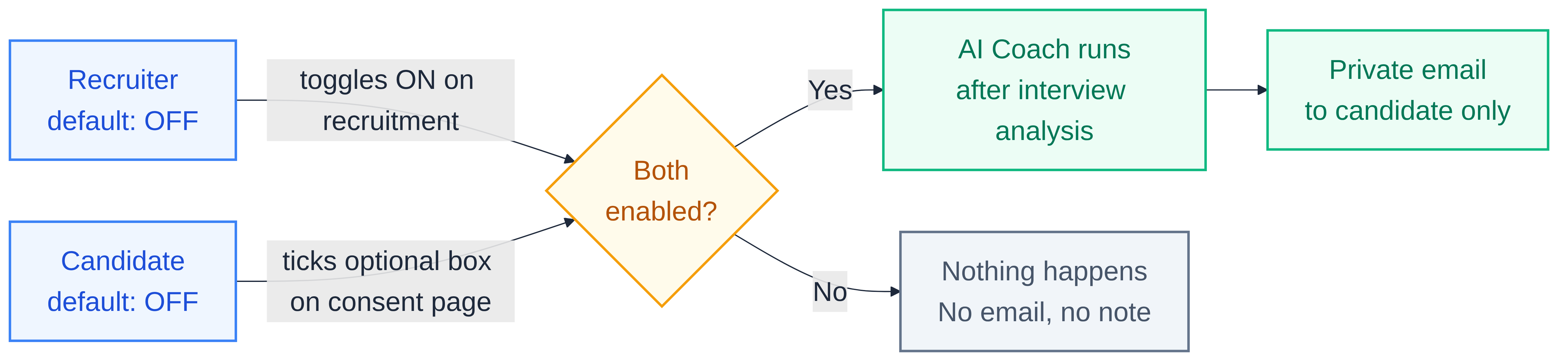
- The recruiter enables AI Coach on the recruitment. Default: off.
- When the candidate receives the GDPR consent email, there is an optional checkbox: "I would like to receive a private AI coaching email after my interview." Default: unchecked.
- Only when both sides agree does the coach run after the interview.
If either side says no, nothing happens. No email. No note.
Who sees the coaching email
Only the candidate. That is the rule.
- The content of the email: candidate only.
- The timing (when it was sent): candidate only.
- Whether the candidate opened it: candidate only.
The recruiter is not shown the coaching output anywhere in the product. There is no recruiter-side page that says "here is what the coach told your candidate". We do not log opens for the recruiter. We do not surface the text in any export or report.
Why this matters for the hiring decision
A candidate reading critical coaching right before an offer decision would feel anxious. A recruiter worried their rejection email might be compared to the coach's output would hesitate to reject at all. Neither is what we want.
Our design makes both of these impossible:
- The recruiter cannot see the coaching. They cannot align their message to it or away from it.
- The candidate knows the recruiter cannot see it. There is no hidden pipeline from AI Coach to hiring decision.
- The candidate chose to receive coaching. It is not a surprise. It is a service they asked for.
How we keep the output safe
AI Coach is the only AI-generated output in our system that reaches an external person without human review. That is a serious responsibility. We handle it with four concrete mechanisms.
1. Recruiter notes are not sent to the coach prompt
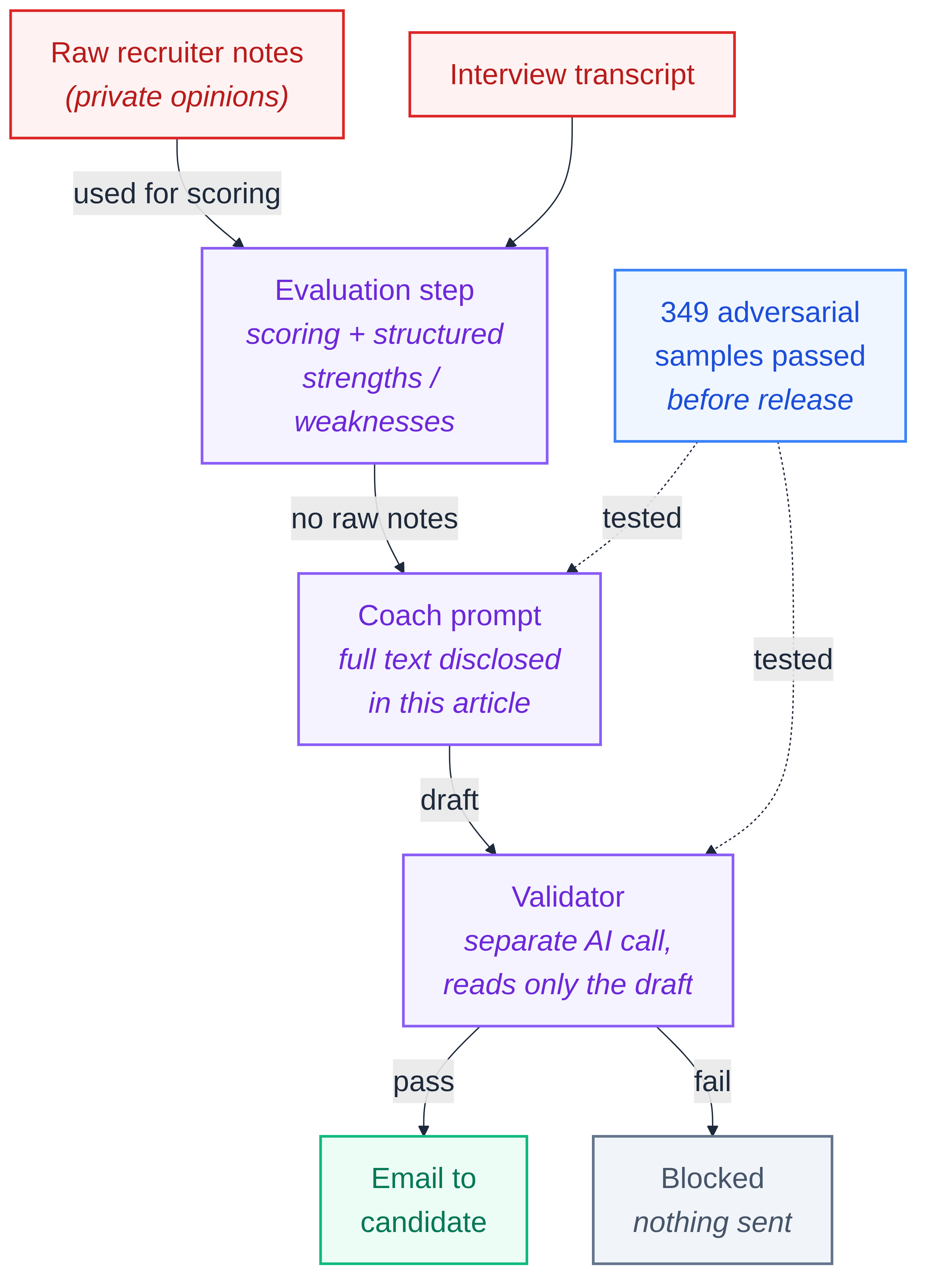
Recruiters type private notes during interviews ("the candidate was nervous", "rambled on the third question", "did not know Kubernetes"). Those notes are used only in the earlier evaluation step, where they influence scoring. The coach prompt that generates the candidate-facing email does not receive the raw notes. It receives the already-processed evaluation: professionally phrased strengths, weaknesses, and scores. Raw recruiter opinions cannot physically reach the candidate's inbox.
2. The coach prompt is a single-purpose career-mentor instruction
We believe in being transparent about what the AI is told to do. The prompt is written in English (we use the same prompt for all 24 languages; the model is instructed to respond in the candidate's language via a separate variable). Here is the actual system prompt used to generate coaching emails:
You are an experienced career coach writing private, confidential coaching notes directly to a job candidate after their interview. The recruiter and hiring company will NEVER see this content, it is exclusively for the candidate's personal development.
EPISTEMIC HUMILITY (CRITICAL): You are observing a single conversation based on a transcript. You cannot see the candidate's full capabilities, broader experience, or how the interviewer actually perceived them. Your job is to surface PATTERNS the interviewer may have noticed and AREAS the candidate could potentially explore, NOT to deliver verdicts on their performance.
Always use hedging language. Frame observations as possibilities, not facts: 'may have come across as...', 'the interviewer might have looked for...', 'one area you could potentially strengthen...', 'your answer could potentially have shown more...'. NEVER state as fact what is your interpretation. The candidate may have been excellent in ways the AI cannot detect from a transcript. Your feedback is ONE perspective offered for reflection, not the truth.
Tone: supportive, curious, mentor-like.
No hidden instructions. No undisclosed sources of context. What you see is what the AI is told.
3. A separate validation request checks the draft before it is sent
Once the coach produces a draft, we run a second, independent AI request whose only job is to read that draft and confirm it meets our standards: no profanity in any language, no identity-based insults, no discriminatory language, no references to who evaluated the candidate. If the validator flags the draft, the email is not sent.
The validator uses its own prompt, its own model call, and its own pass/fail contract. It does not see the interview transcript or the recruiter notes, only the draft itself, judged on its own content.
4. We tested the system against 349 adversarial samples
Before release, we built a test suite of 349 deliberately hostile inputs: crude recruiter notes, profanity in five languages, personality attacks, protected-characteristic slurs, attempts to extract the interviewer's identity. Every first-pass generated email was safe before the separate validator was applied; the validator did not need to block a single one of those 349 drafts. It remains an independent extra safeguard for future inputs outside that test set.
How to enable it
In the recruitment form, toggle Enable AI Coach for candidates. The toggle has an info icon next to it, click it for the short version of this article.
When you invite candidates, their consent email will include an optional checkbox for AI Coach. The candidate decides per recruitment; they can opt in for one and skip another.
Closing
If you have been hesitant about sending candidates AI-written output, you were right to be. We were hesitant too, for the same reasons. That hesitation is exactly why AI Coach works the way it does.
It is not an add-on we force on candidates. It is not a tool that helps the recruiter by proxy. It is a service the candidate asks for, written by an AI that is not allowed to see anything it should not, validated before it is sent, and invisible to the person making the hiring decision.
If that sounds like something your candidates would want, turn it on.