
The Problem: One Demo, 24 Markets
We sell to recruiters across the European Union. That means 24 official languages. When we needed a product demo video for our website and YouTube, the math was brutal.
Recording one 3-minute demo takes about a day of work. Script, screen recording, narration, editing, subtitles. Multiply that by 24 languages and you are looking at a month of manual video editing. And every time the UI changes, you start over.
We decided to treat video production the way we treat software: as a pipeline with reproducible, idempotent steps.
The Architecture: 22 Numbered Scripts
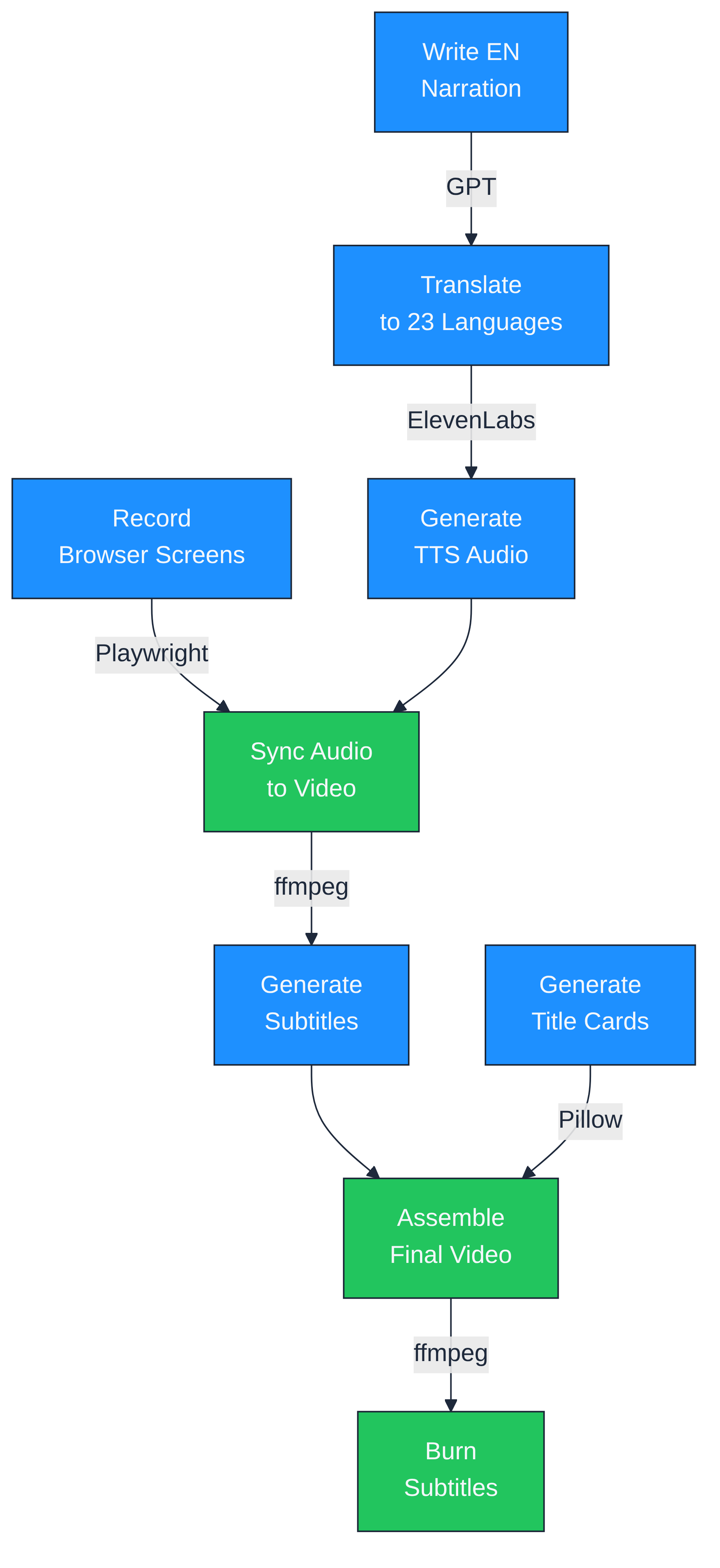
The demo pipeline is a folder of numbered Python scripts. Each one does exactly one thing. The output of one feeds into the next.
Here is the full flow:
- Write narration in English (one markdown file, 8 scenes)
- Translate to 23 languages using GPT
- Generate TTS audio with ElevenLabs (17 languages) and edge-tts fallback (7 languages), both with word-level alignment
- Record browser screens with Playwright (one recording per scene per language)
- Sync audio to video using a custom algorithm
- Generate subtitles from TTS word alignment data
- Generate title cards with Pillow (translated via GPT, cached)
- Assemble intro + slides + scenes + outro into one MP4 per language
- Burn subtitles into a second version for web embedding
Every step is a standalone script. You can re-run any step for any language without touching the others. If the German narration sounds wrong, re-generate TTS for German, re-sync, re-assemble. Nothing else changes.
The Hard Part: Audio-Video Sync
This is where most automated video pipelines fall apart.
The screen recording shows specific UI interactions. Click here, type there, scroll down. Each scene has a fixed video duration, determined by what happens on screen. The English recording of Scene 2 (Create Recruitment) takes 25.2 seconds.
But the German narration of the same scene takes 30.6 seconds. The Slovenian narration takes even longer. The Danish version is shorter than English.
You cannot just overlay the audio. The narration would end while the screen is still moving. Or the screen would freeze while the narration keeps going.
Three Strategies, Chosen Automatically
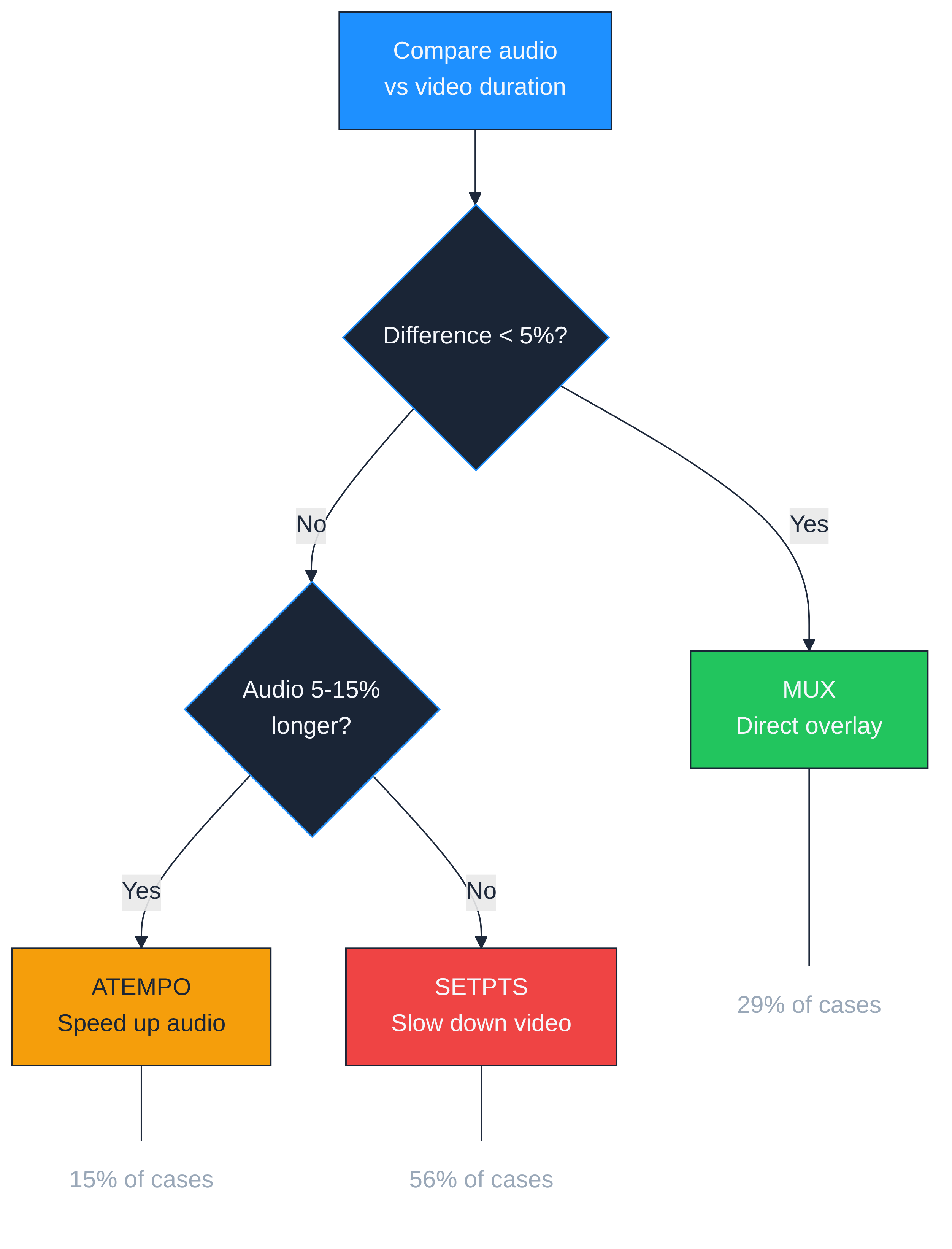
For each scene in each language, the pipeline compares the audio duration to the video duration and picks one of three strategies:
Mux (direct overlay). When the difference is less than 5%, the audio and video are close enough. Just combine them. This happened in 29% of our 192 language-scene combinations.
Atempo (speed up audio). When the audio is longer than the video by 5% to 15%, the pipeline speeds up the narration using ffmpeg's atempo filter. A 10% speedup is barely perceptible. This handled 15% of combinations.
Setpts (slow down video). When the audio is significantly longer, speeding up the narration would sound unnatural. Instead, the pipeline slows down the video to match audio duration. The visual pacing becomes slightly more relaxed. This was the most common strategy at 56% of combinations.
The algorithm never stretches audio beyond 15% because it starts sounding robotic. And it never slows video beyond 25% because the UI interactions start looking sluggish.
Real Numbers
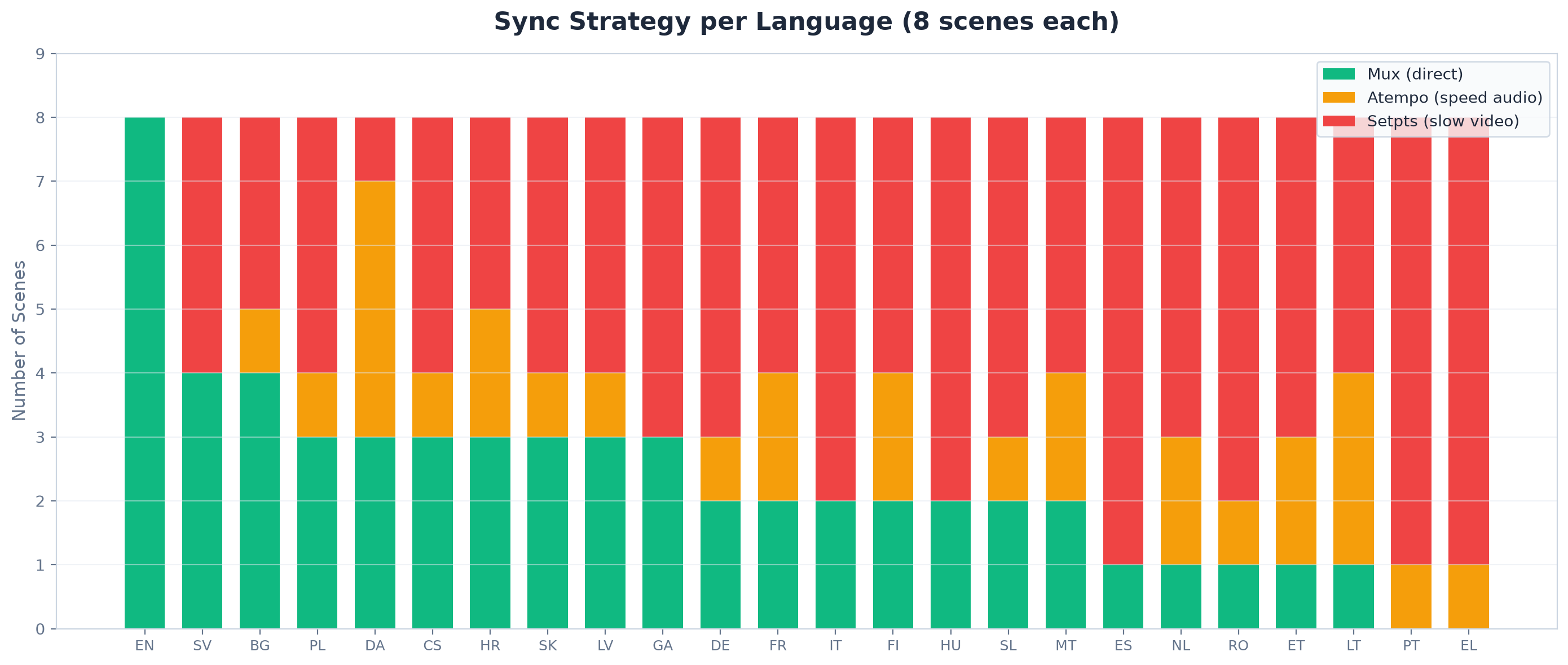
English is the baseline language. All 8 scenes used direct mux (0% adjustment needed). Every other language required at least some correction.
Greek and Portuguese needed the most adjustment: zero scenes with direct mux, meaning every single scene required either audio speedup or video slowdown. Danish and Swedish were closest to English with only minor corrections.
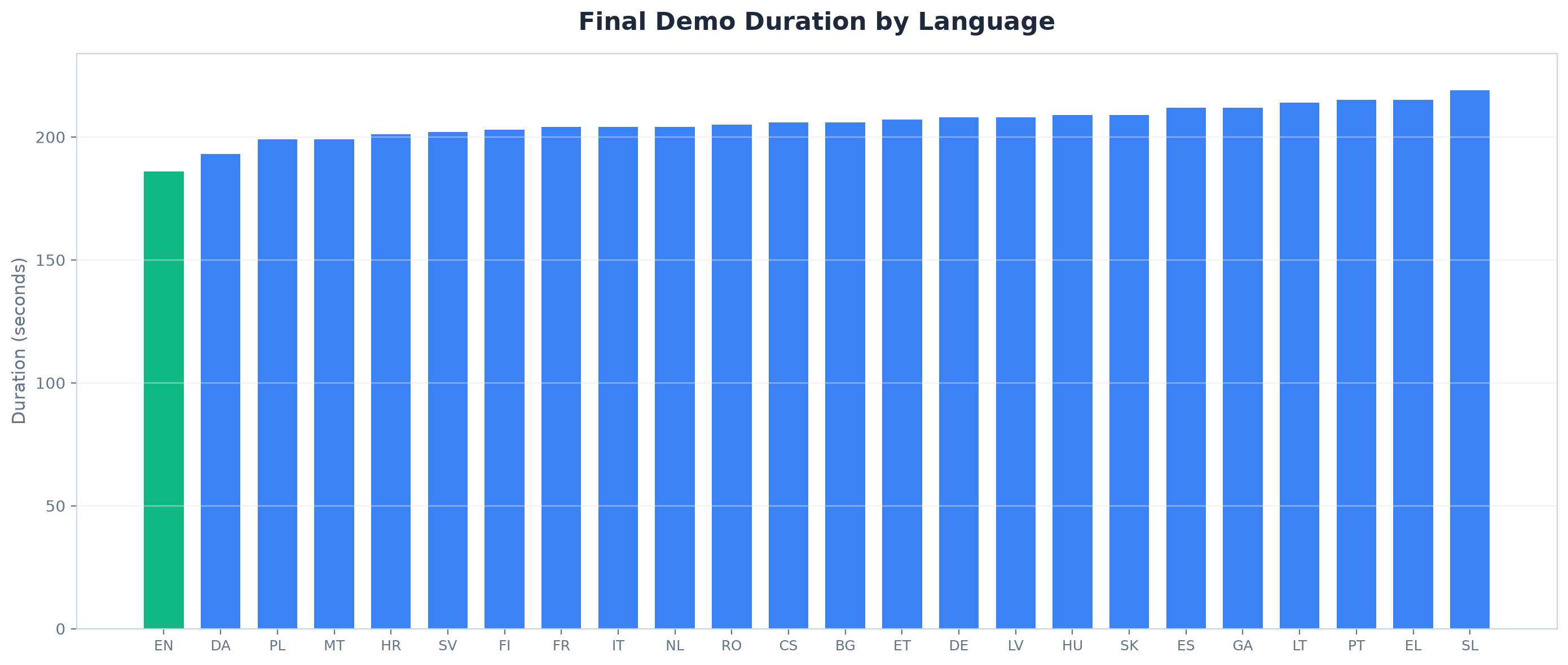
The shortest final demo is English at 3:06. The longest is Slovenian at 3:38. That is an 18% spread from the same source material. Finnish is the most compact after English at 3:23, while Greek and Portuguese both push past 3:35.
TTS: ElevenLabs with Edge-TTS Fallback
ElevenLabs (eleven_multilingual_v2 model, "Brian" voice) is our primary TTS engine. It covers 17 of the 24 EU languages with natural-sounding multilingual narration and returns character-level alignment data that we convert to word timestamps for subtitle generation.
For the 7 languages ElevenLabs does not support (Hungarian, Slovenian, Estonian, Lithuanian, Latvian, Irish, Maltese), the pipeline falls back to Microsoft Edge TTS. Edge-tts is free, uses Microsoft neural voices, and provides WordBoundary events with the same word-level timing data.
Both engines feed into the same subtitle pipeline. The caller does not need to know which engine produced the audio. The generate_audio() function checks the language, picks the right engine, and returns the same (duration, word_alignment) tuple either way.
Subtitles: From TTS Alignment to SRT
Because both TTS engines give us word-level timestamps, we can generate subtitles without any manual work.
The subtitle script groups words into chunks of 5 to 8 words, each lasting 2 to 4 seconds. Then it runs an OpenAI correction pass to fix TTS normalization artifacts (numbers spelled out as words, abbreviations expanded) by comparing against the original narration text.
The result is an SRT file per scene per language. The assembly script merges them with time offsets into one SRT for the full demo.
For the website, where videos autoplay muted, we burn the subtitles directly into the video using ffmpeg's subtitles filter. White text on a semi-transparent black box, positioned near the bottom. The clean version without burned-in subtitles goes to YouTube, where we upload the SRT separately.
Title Cards: GPT Translation with Caching
Every demo has 10 title cards: an intro, 8 section slides, and an outro. The intro shows the product name and a translated tagline. Section slides show the step number, a short label, and the scene title. The outro is a call to action.
All text on these cards needs translation. We use GPT to translate the 11 source strings per language, cache the results in a JSON file, and regenerate only when the source text changes or you explicitly force it.
The cards use the same color scheme as our web portal dark theme. Segoe UI font, which ships with Windows and handles all Latin, Greek, Cyrillic, and Baltic scripts used in EU languages.
Assembly: 18 Segments Per Video
The final assembly concatenates 18 video segments per language:
- 1 intro card (3 seconds, silent)
- 8 section slides (2 seconds each, silent)
- 8 scene recordings (variable length, narrated)
- 1 outro card (3 seconds, silent)
All segments are normalized to the same format (H.264, 30fps, 1920x1080, AAC audio) before concatenation. Title card PNGs are converted to silent video clips using ffmpeg.
The assembly script supports parallel processing. With 4 workers, all 24 languages assemble in about 10 minutes instead of 40.
The Result
24 demo videos. Each one 3 to 3.5 minutes long. Narrated in the viewer's language. Subtitled. With consistent branding.
Total output: 600 MB of clean videos plus 600 MB of subtitled versions. The entire pipeline from English narration to 24 assembled videos runs in under 2 hours, most of which is TTS generation and ffmpeg encoding.
When we update the UI, we re-record the affected scene, re-sync, re-assemble. A single-scene update for all 24 languages takes about 15 minutes.
Try It Yourself
We use this pipeline to produce demos for AI Interview Analyzer, an AI-powered tool that helps recruiters conduct structured interviews, analyze candidate responses, and make evidence-based hiring decisions. The product itself is available in all 24 EU languages.
You can watch the demo in your language on our homepage or on YouTube.